 Social Suit
Educational information, not individual medical or legal advice. Practical examples are hypothetical and do not describe clients or study participants. This article is not represented as reviewed by a clinician or attorney. How we prepare our guides.
Automatic checking is a pattern you can describe
You unlock the phone to check the time and discover that a social media app is already open. You sit down to begin an assignment and reach for the feed before reading the first question. You pick up the device while waiting for a reply, then move between several apps without a clear purpose. These moments can feel confusing because the action starts before you experience it as a decision. The useful response is to slow down one example and identify what happened. Calling the behavior automatic describes its timing; it does not establish a diagnosis or mean that you have no possible influence over it.
This guide focuses on the opening itself: the small transition between an ordinary situation and an app session. That is different from the question of why a long session continues, why particular content feels upsetting, or whether symptoms need a professional assessment. Those issues can overlap, but a more precise starting point makes a practical experiment easier. You may be able to interrupt a recurring opening without banning every useful online activity. You may also discover that the opening serves a need that should be addressed directly, such as uncertainty about a task or a desire for contact.
Choose a recent event you can remember accurately. Write what you were doing, where the phone was, what happened immediately before touching it, and which screen appeared first. If you do not remember, do not invent an explanation. Observe the next opportunity instead. “I opened the app while the microwave ran” gives you a recognizable setting. “I open it because I am addicted” closes the question before you have described the sequence. Begin with details that someone else could understand, and keep the explanation provisional while you learn what repeats.
Why the cue matters more than a general promise
A cue is the event or context just before the action you want to examine. It might be external, such as a sound, a badge, a waiting period, or seeing the phone. It might be internal, such as noticing boredom or discomfort. You do not need to decide which category is most important in general. You need to identify what is relevant to your particular opening. A general promise to be more disciplined can be difficult to apply at the exact moment a file is loading or a task becomes unclear. A specific plan for that moment gives you something you can practice.
Consider two people who both check an app ten times during an afternoon. One does so each time a message alert appears. The other has alerts disabled but opens when they encounter a difficult sentence in their work. Their totals look similar, but the likely starting points for change differ. The first person can review which signals need to arrive immediately. The second can prepare a small next step for the task or choose a different kind of pause. Neither person benefits from assuming that the same device setting must solve both situations simply because the number of openings is equal.
Keep the cue description short. “When I sit on the couch after putting the dishes away” is usable. “Whenever life is stressful” may be true but is too broad to tell you what to do next. You can explore the broader issue separately. The first experiment should involve a setting you are likely to encounter again soon. That allows you to observe whether the cue reliably appears, whether the app opening follows, and whether a modest adjustment changes the sequence. If the pattern varies widely, begin with the example that causes the clearest interference rather than try to capture every possible opening.
Separate an automatic opening from useful phone use
The phone may be essential for work, transport, caregiving, accessibility, banking, or communication. An experiment that makes all use difficult can introduce unnecessary obstacles. List the functions you need in the setting you are investigating. If you pick up the device to check a bus arrival, the relevant problem may be moving from the transit information into the feed afterward. If you need a message from a family member, the problem may be browsing other content while waiting for it. Preserve the necessary function and focus on the transition that leads somewhere you did not intend to go.
For a student, a class group can be useful even when the app containing it also has a distracting home screen. A practical boundary might be to check the group at a planned time, answer the relevant messages, and leave. A worker might need an authentication app during the day but not a recommendation feed beside its icon. A person who uses a phone for communication support might keep it close and alter only a specific shortcut or alert. The right arrangement respects the actual function of the device rather than assume that distance from the phone is always possible.
After changing a route, test the things that matter. Can you still reach the needed information? Do important contacts know how to reach you? Did the adjustment quietly disable an essential alert? A plan should be judged partly by these questions. If you lose necessary access, revise the plan promptly. Useful use and unwanted use can occur within the same minute, so an all-or-nothing rule may hide the distinction you need. For a broader review of interference and priorities, read When social media use starts to feel out of control, then return to the specific opening you want to change.
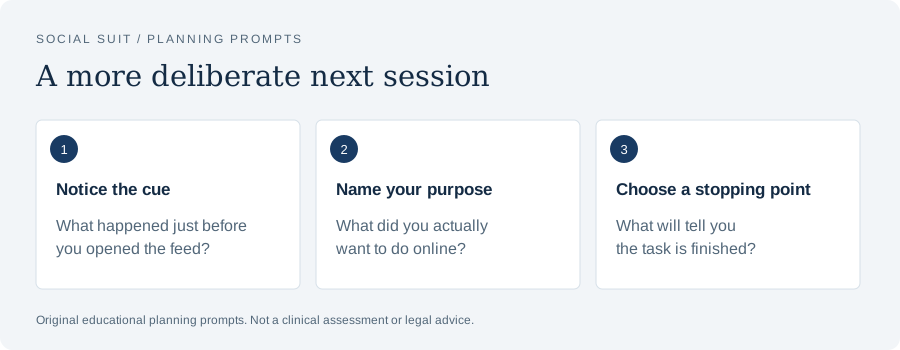
- Notice the cueWhat happened just before you opened the feed?
- Name your purposeWhat did you actually want to do online?
- Choose a stopping pointWhat will tell you the task is finished?
Observe a few openings without turning yourself into a monitor
You do not need a record of every screen touch. Choose a short period or a recurring setting, such as the first hour after arriving home. Each time you notice an unplanned opening, make a brief note after closing the app. Include the cue, the original purpose if there was one, and whether the session affected another activity. If a session was useful, record that too. The point is to understand the pattern, not create a collection of evidence against yourself. A log that records only mistakes will not show which phone functions you should preserve.
An entry might say: “Opened while waiting for the printer; looked at recommended videos; returned to the document after about five minutes.” Another might say: “Opened from a direct message alert; answered a real question; closed promptly.” A third might say: “Picked up phone after struggling with the first paragraph; no message to answer; scrolled until lunch.” Even these three entries suggest different routes. The first involves waiting, the second purposeful communication, and the third an unclear or unpleasant task. You can choose one route rather than treat all three as the same problem.
Store the notes privately and keep the detail proportionate. You do not need to copy private messages, record another person's account activity, or upload a detailed log to a public tool. A parent can ask a teenager to help identify a shared pattern without demanding an archive of all conversations. Once you have a few examples, review the notes and select one change. Endless measurement can itself become another task that you avoid. See Building a screen-time baseline that is actually useful for ways to combine device totals with context while avoiding conclusions that the totals cannot support.
The waiting-moment opening
Waiting is a common setting to examine because it creates a small, repeatable pause. A kettle boils, a lift arrives, a page loads, or another person looks for a document. The phone is often available, and opening a feed requires little preparation. The resulting session may last beyond the wait because the original stopping signal is no longer visible. You began during a thirty-second gap but continue after the task can resume. Identify the event that should end the pause before deciding what alternative to try.
For a short wait, the alternative can be equally small. Put down the device, look around, take a sip of water, or prepare the next step of the task. If you are waiting for a document to load, write a note about what you want to check when it appears. If you are waiting for transport, you might choose one saved article with a clear end rather than enter an open feed. If the phone is necessary to watch the arrival estimate, keep that screen visible and decide where it goes once the information is available. The alternative should fit the actual length and location of the pause.
A simple test is to identify the waiting cue and rehearse one response on several ordinary occasions. Count how often you notice the cue before opening, not only how often you avoid the app entirely. Noticing a moment after the app opens still gives you a chance to leave. If the wait regularly becomes long or frustrating, you may need a planned activity rather than a ten-second pause. Avoid making the experiment unnecessarily heroic. A person can enjoy entertainment while waiting and still decide that a particular recommendation feed makes returning to the original activity harder than they want.
The difficult-task opening
An app opening during work or study can occur at the point where the task stops being clear. You know you should write an email, complete a problem, or begin a report, but the next step feels vague. The feed offers a ready-made action while the task requires a decision. Before changing device settings, inspect the task itself. Can you name the first action? Is the material you need available? Are you trying to complete too much in one interval? A boundary may work better when it protects a task that is actually defined.
Instead of “work on the report,” write “open the outline and draft the first paragraph explaining the main finding.” Instead of “study chemistry,” choose “attempt the first three practice questions and mark where I need help.” Instead of “deal with the inbox,” choose one message and decide what response is needed. These examples do not guarantee concentration. They reduce uncertainty at the point you identified. Keep a scrap of paper for the thought that might otherwise prompt an app opening: a question to look up later, a reminder, or a concern about a message you are expecting.
After a short interval, review whether clearer preparation changed the opening. If you still reached for the phone, ask what happened just before it. The issue might involve discomfort, tiredness, an incoming signal, or a task beyond your current understanding. A teacher, colleague, or supervisor may help clarify a practical obstacle. If concentration difficulties are persistent or part of broader symptoms, do not assume an app is the entire explanation. The single-tasking guide and study-session boundaries guide expand this approach without treating every interruption as a failure of willpower.
The notification-led opening
If a sound or badge routinely starts the sequence, reviewing notifications may be more direct than trying to ignore every signal. Begin with the alerts that communicate something actionable. A caregiver message, a work request during an agreed work period, or a time-sensitive school update may deserve prompt attention. Recommendation alerts, promotional announcements, and reminders to view content may not serve the same function. Platform menus change, so check the current categories in the app and device settings. Do not assume that disabling one sound also disables badges or alerts on another connected device.
Choose one unnecessary category and turn it off for a few days. Observe whether the cue disappears and whether you miss anything important. If the app permits separate direct-message controls, preserve what you need. If the categories are not separable, you might choose a planned check and a different urgent route for essential contacts. Tell people who depend on your response what that route is. Test the change in a low-stakes setting before relying on it for an important responsibility. A quieter setup should improve the fit between signals and needs, not merely reduce a number.
Notice what happens after a legitimate alert. You may answer a message appropriately and then move into unrelated content. In that case, the alert itself is useful but the exit route needs attention. A plan could be: reply, check whether another needed message is waiting, then put the phone down before returning to the task. The stopping point should be concrete. “Do not get distracted” is less usable than a brief sequence. Read Making your notifications less demanding for a fuller review. If a necessary notification still regularly begins a long session, combine alert review with a planned return action rather than disable the needed communication altogether.
The emotion-led opening
Sometimes the minute before opening includes loneliness, worry, anger, disappointment, or a feeling you cannot easily name. You can notice that sequence without treating the feeling as a problem to eliminate. Ask what you hoped the app would provide. Were you seeking contact, distraction, reassurance, or information? Did the session provide it? How did you feel afterward? The same action may help in one situation and leave you worse in another. Keeping those distinctions visible prevents a blanket rule from hiding the actual need.
If you wanted contact, consider whether a direct message to someone trusted would be more useful than browsing unrelated content. If you wanted reassurance about an event, identify what information is available and when a meaningful update is likely. If you wanted a pause from a difficult feeling, choose a modest alternative that feels manageable, such as a familiar activity or a conversation. These are options for an experiment, not a substitute for professional care. Do not demand that a short walk or a different app setting resolve persistent distress. A device plan can support daily routines while a broader problem deserves separate attention.
The NIMH guide to deciding when to seek help emphasizes how symptoms affect daily life and recommends professional assistance for severe or persistent symptoms. If you are worried about functioning, describe the pattern to a healthcare professional rather than diagnose its cause from a log. If there are thoughts of suicide or urges to self-harm, seek immediate help; in the United States call or text 988, or call 911 for a life-threatening emergency. An ordinary habit experiment should never become a reason to postpone urgent support or a claim that you ought to handle a serious emotional difficulty alone.
The location-led opening
A particular place may make the phone the easiest available activity. You sit in the same chair after dinner, wait in the same corridor, or lie down with the device beside the pillow. The location itself can provide an opportunity to change the sequence. Inspect what is within reach, what you usually do there, and which phone functions are needed. You might place a chosen activity where the device normally sits or move the charger to a spot that still meets accessibility and safety needs. The change should fit the space you actually have.
For example, if the kitchen counter is where you repeatedly begin browsing during meal preparation, keeping the recipe visible on another screen or using a printed note might make the task easier to continue. If you use the phone as the recipe, decide where it rests between steps rather than hold it while waiting. In a living room, a hobby basket beside the chair may provide a more available option. In shared housing, you may not control an entire room, but a small change to the objects around your usual seat can still support a deliberate choice.
Test whether the arrangement works under ordinary conditions. A phone across the room may be unsuitable for a person who needs communication support or caregiving alerts. A hobby replacement may be impractical in a public waiting area. A rule designed for one location may not fit another. Keep the experiment local enough to evaluate. For nighttime arrangements, see Keeping the phone away from the pillow. For general changes to access, see Using friction to interrupt a scrolling habit. The purpose is to create a useful pause, not to make your environment inconvenient enough that you abandon the plan.
Write an if-then plan in ordinary language
Once you identify a recurring cue, write a short plan that connects it to a response. “If I pick up the phone while the page loads, then I will leave it on the desk and write the next step on paper.” “If I receive a direct message during dinner, then I will check whether it is urgent and return to the table after answering.” “If I open the feed after getting into bed, then I will close it and move the phone to its charging place.” The words should describe an action you can actually perform in that setting.
Include the reason if it helps you remember. You are protecting a meal, a conversation, a work interval, or the next morning. Avoid a plan that asks you to control an emotion before doing anything else. “If I feel bored, I will stop feeling bored” is not an action. “If I feel bored while waiting, I will look at the arrival screen once and then put the phone away until the bus approaches” is more observable. The plan can remain modest. You are practicing one transition, not proving that you can maintain perfect attention all day.
Review the plan after several opportunities. Did the cue occur? Did you notice it soon enough? Was the response practical? Did it preserve necessary use? If it failed, identify which part was missing. You may need a more visible reminder, a simpler response, or a different cue. A plan that works at home may not work at school or work, and that is useful information. Add a second setting only after the first makes sense. The realistic limits guide helps translate a broad goal into a protected activity when an if-then sentence still feels too vague to follow.
Make the alternative immediately available
An alternative that requires preparation may lose to the app at the moment you notice the cue. If you want to draw during a short break, put a pencil and paper where you take the break. If you want to read, choose a book and keep it near the chair. If you want to contact a friend, decide who you might message rather than search through a feed for connection. If you want to return to a task, leave the next step visible. Availability is a practical feature of the plan, not an indication that the alternative is inherently better for everyone.
Match the alternative to the setting and time. A two-minute pause does not need a complex hobby. A person waiting for a medical appointment may prefer a saved article, quiet music, or simply sitting without another task. Someone with fatigue may need rest rather than exercise. A student in a busy corridor may not have privacy for a phone call. A worker may need to remain available for a specific signal. The alternative should respect these circumstances. If the chosen activity becomes another demand, it may not provide the function that the app was serving.
Observe what happens after the alternative. Does it make returning easier? Do you find it enjoyable or useful? Does it last much longer than intended, creating a new version of the same problem? Any activity can become poorly timed. The aim is not to replace a feed with an unquestioned virtue but to make a choice that fits the period you wanted to protect. Read Choosing breaks that do not become another feed for examples of breaks with a beginning and end. Keep what works in your circumstances and remove parts that add effort without addressing the opening you identified.
Use device controls as support, not a complete explanation
App limits, focus modes, notification controls, and home-screen changes can support a plan. They are easier to judge when you know what pattern each is intended to interrupt. An app timer may provide a reminder near a planned stopping point, but it may not prevent opening during an unclear task. A focus mode may quiet selected alerts, but it does not resolve a conflict about how quickly colleagues expect a response. A hidden icon may create a pause, but it will not necessarily address loneliness. Begin with the pattern, then choose the control that matches it.
Review the current device documentation or settings before relying on a feature. Names, available exceptions, and behavior vary. A setting may apply to one device but not another. An app may remain accessible through a browser. An urgent contact exception may need a test. Make one low-stakes trial before expecting the arrangement to protect an important meeting or overnight caregiving situation. You do not need the strictest possible setup. A reminder you can understand and adjust may be more useful than a complicated lock that interferes with necessary functions and prompts you to disable everything.
When you override a control, ask why. Did you need a legitimate function? Did the reminder arrive in the middle of a meaningful conversation? Was the limit unrealistic for the day? Did you simply continue browsing without considering it? These answers suggest different adjustments. Keep the focus on what happened rather than treat every override as identical. Device tools can make a boundary visible, but the routine around them still matters. Combining a clear task, a practical alternative, and an appropriate reminder often gives you more information than repeatedly lowering a timer without examining the circumstances in which you bypass it.
When the app opens, use the moment you still have
Noticing the opening after it happens is not too late to make a choice. You may catch yourself on the home screen, after one video, or several minutes into the feed. Pause long enough to ask what you intended to do. If there was a needed message, answer it. If there was no purpose, decide whether you want to continue now or return to the activity you meant to protect. The question should be brief. Turning the pause into a long self-criticism can make the experiment unpleasant without helping you leave.
Choose a simple exit action in advance. Put the phone in its usual place, reopen the task document, stand up to continue meal preparation, or return your attention to the conversation. A visible next step reduces the gap between closing the app and resuming. If you close one app and immediately open another, note that transition. The issue may be the unstructured pause rather than a particular platform. You can design a boundary around entertainment feeds as a category while preserving a needed function, or choose a clearer alternative for the moment that keeps producing openings.
Count successful noticing as useful data. A day when you caught the pattern twice and returned to work is different from a day when you did not notice it at all, even if neither was perfect. Avoid setting a success criterion of never having an impulse. The experiment concerns the response you practice, not the elimination of every thought about the phone. If you want a structured short trial, see Designing a seven-day digital reset. It can help you record a repeatable decision without interpreting a single automatic opening as proof that the entire week failed.
Explain the change to people who rely on your response
Some openings occur because you are unsure whether a message needs attention. Clarifying expectations can be more useful than guessing. At work, ask which channel is for urgent matters and which messages can wait until a planned check. In a household, agree on how someone should contact you during a protected period. With friends, explain that a slower social-message response does not mean you are avoiding them. The conversation does not have to involve a dramatic announcement about quitting technology. State the practical change and the route that remains available.
For example, you might say: “I am trying to keep the first half-hour of studying free from feed checks. If something is urgent, please call. I will look at the group messages after the interval.” A caregiver might say: “I keep direct calls available while recommendations are off.” A worker might ask: “Do you expect an immediate answer in this channel, or can I check it after finishing the report section?” These statements help distinguish real expectations from assumptions. A boundary cannot be evaluated fairly if you believe every unread message might violate an obligation that has never been clarified.
Respect the limits of your control. Some jobs have genuine on-call requirements. Some family situations need prompt communication. A teenager may have rules set by adults. In these circumstances, preserve the necessary route and focus on unrelated browsing around it. If expectations are unreasonable or unclear, an appropriate conversation may be part of the solution, but an article cannot resolve the workplace or household relationship for you. Read Making work messages less constant for questions to discuss. The goal is a practical agreement that reduces unnecessary checking without quietly neglecting a real responsibility or placing another person in an unsafe situation.
Keep a family experiment proportionate
If you are helping a child or teenager, distinguish concern about automatic use from a demand to control every online interaction. Begin with a shared observation, such as repeatedly delaying the homework start, rather than a global accusation. Ask what happens in the moment before opening and what the young person needs from the app. They may be coordinating schoolwork, seeking a friend, or responding to an upsetting interaction. You can set age-appropriate boundaries while still listening to that account. A rule that ignores the useful function may be harder to sustain and may conceal a different concern.
Agree on one protected activity and one review date. A family might test a device place during dinner, a planned group-message check during homework, or a quieter period before bed. Adults can model the same boundary where practical. Avoid making a child's private report a public comparison with siblings or friends. The record should help identify what changes the sequence, not become a tool for humiliation. If the young person describes harassment, threats, distressing content, or significant impairment, address those concerns directly rather than assume a generic screen-time limit is sufficient.
The APA adolescent social media advisory emphasizes that recommendations need to account for developmental capabilities, context, and differences between young people. That supports careful individual discussion rather than a claim that one age or one time total answers every question. A family plan is an experiment, not clinical care. If a child or teenager has persistent symptoms or difficulties with ordinary functioning, seek appropriate professional guidance. Keep the conversation open enough that the young person can say what is happening online without expecting every disclosure to lead immediately to punishment or loss of a needed source of support.
Review setbacks without escalating every rule
A setback tells you something about the setting. Perhaps the plan worked when you were rested but not after an unusually difficult day. Perhaps the app timer appeared during a necessary conversation. Perhaps you moved the icon but continued opening through notifications. Record the specific sequence before tightening the rule. If you change several things at once, you may not know which problem the new arrangement solved. An increasingly strict system is not automatically a better one if it becomes impractical and eventually gets disabled entirely.
Ask four questions: Was the cue identified correctly? Was the response available? Was an important exception needed? Was another problem interfering? The answers can suggest a small revision. A waiting cue might need a visible next task. A message cue might need a better exit route. An emotion-led opening might need contact or broader support. A plan that conflicts with work may need a different protected period. None of these adjustments requires you to interpret the setback as a statement about your character. Restore the next ordinary boundary and test the revised step.
Keep successes in view as well. If an afternoon included several deliberate checks and one unwanted session, the deliberate choices still matter. You can learn from the exception while preserving the part that worked. Read What to do after a scrolling setback for a more detailed review. If the pattern repeatedly interferes with daily life despite reasonable experiments, consider seeking professional assistance. The point of a habit plan is to help with a defined problem, not to create an obligation to solve every concern alone before you are allowed to ask for support from someone qualified to help.
A seven-day opening experiment
For the first day, observe a small number of openings in one setting. Do not change everything. Write the cue and the original purpose. On the second day, select the most repeatable cue and prepare one alternative. On the next several days, practice the same response and record whether it was practical. At the end of the week, compare similar opportunities rather than judge the entire week by total minutes alone. This is an original planning example, not a validated treatment program or a promise that a week will resolve a persistent problem.
Suppose your selected setting is the start of an evening study period. Your cue is uncertainty about the first task. Your response is to place a short task card beside the laptop before sitting down. Needed class messages remain available at a planned check after the interval, with an urgent route if appropriate. Each day, note whether you began the task, whether an unplanned opening occurred, and what happened just before it. If the pattern shifts to another cue, record that rather than insist your original explanation was correct. The experiment should teach you what is actually occurring.
At review, keep the successful part and identify one remaining issue. Perhaps the task card helped but a badge still drew attention. Perhaps the protected period was too long. Perhaps the app was useful for the task and the exit route mattered more than the opening. Make the next change specific. You can read Setting limits you can realistically keep to define the boundary or Using friction to interrupt a scrolling habit to examine access. The week is useful if it gives you a clearer understanding and a feasible next step, even if it does not produce an impressive reduction in the device report.
Keep claims about the brain and platforms careful
It is tempting to explain an automatic opening through a dramatic statement about brain chemistry or a platform's intent. Such a statement may sound decisive while telling you little about your particular situation. This guide does not claim to measure your brain, establish a disorder, or prove why a company designed a feature. It focuses on the sequence you can observe. A notification appeared; you opened the app; the session continued; a task waited. That account is sufficient to justify a practical boundary without adding an explanation you cannot verify.
Likewise, avoid assuming that automatic use proves serious harm or legal eligibility. The significance of a pattern depends on its effects and the surrounding facts. A person can seek healthcare support for symptoms without proving a platform caused them. A person considering legal options needs an individual review of accurate information and applicable law. These decisions are separate from an experiment about a cue. If you want general information about potential legal next steps, Social Suit's social media harm information page links to an independent intake destination. Eligibility and outcomes are not guaranteed.
Keep records factual if you choose to document concerns. Describe what happened, preserve original material where appropriate, and avoid collecting another person's private information without authority. Do not exaggerate a screen-time total or assign dates you do not remember. A truthful account can include uncertainty. No resource article can determine a claim's value, deadline, or viability from a habit log. Healthcare and immediate safety should remain priorities. Learning to notice a recurring opening may be useful on its own, whether or not you pursue a legal review, and an informational link should never become pressure to describe your experience as more certain or severe than it was.
Your next useful pause
Return to the example you chose at the beginning. Can you identify the moment immediately before opening? Can you name what the app was supposed to provide? Can you preserve a necessary use while changing the unwanted transition? If the answers remain unclear, observe one more ordinary opportunity instead of adding a stricter rule. If the cue is clear, prepare a small response that fits the setting. Keep it available and try it several times. The aim is to make the moment more deliberate, not to remove every urge to check a device.
When you notice the pattern, ask one question: “What did I mean to do next?” Answer it concretely. You might reply to the message, return to the report, finish the meal, wait for transport, or choose entertainment intentionally. A deliberate decision to enjoy a video can fit your day. An unplanned sequence that repeatedly displaces something important deserves adjustment. The distinction is more useful than labeling every opening as either good or bad. It helps you decide what to preserve and what to change based on the effect in your own circumstances.
Give the experiment a clear review point and permission to change. A practical plan should become easier to understand as you learn, not more punitive every time an opening occurs. If distress or impaired functioning is persistent, seek appropriate support and explain the pattern with the observations you have. If the concern is primarily a repeated moment of drift, keep the next step modest enough to practice today. One useful pause at a recognizable cue can show you where a better routine begins. From there, continue with the part of the day you intended to protect, and use what you observed to choose the next adjustment.
Sources and further reading
These primary resources provide context. Our practical examples and planning suggestions are original educational material, not validated treatment protocols. Linked organizations do not endorse Social Suit.