 Social Suit
Educational information, not individual medical or legal advice. Practical examples are hypothetical and do not describe clients or study participants. This article is not represented as reviewed by a clinician or attorney. How we prepare our guides.
Begin with the job an alert is doing
A notification is a request to move your attention. Sometimes that request carries information you need immediately. Sometimes it carries information you want eventually. Sometimes it merely announces that an app has something available to browse. Those are different jobs, even when they arrive with the same sound, vibration, banner, and red badge. Making notifications less demanding begins by identifying those jobs. The goal is a setup in which you can tell what deserves a response without opening everything. That can preserve useful communication while reducing the invitations that repeatedly interrupt meals, conversations, study, or work.
Start with the actual interruption that concerns you. Perhaps a promotional alert regularly arrives while you are writing. Perhaps a group conversation wakes the household at night. Perhaps the number on an app icon creates a persistent urge to clear it, although the items behind it are recommendations rather than messages. Describe the event before choosing a solution. Turning off every notification could remove the interruption, but it could also create a practical problem if that same app carries school announcements or messages from someone you support. A narrow description makes a narrow, useful change possible.
Treat the review as ordinary maintenance. You already decide which letters to open immediately, which tasks to schedule, and which conversations can wait. Notification settings offer another place to make those decisions. They do not require a diagnosis, a confession about your character, or proof that your screen time is unusually high. You can prefer fewer interruptions simply because your present arrangement is inconvenient. Conversely, a quiet phone does not establish that your relationship with technology is healthy. The meaningful question is whether the arrangement supports the activities and relationships you intend to protect.
It helps to separate the alert from the underlying service. You might want to keep a neighborhood group while removing alerts about every comment. You might need a delivery app but have no use for its promotional reminders. You might enjoy a creator's posts without needing a push notification whenever a new one appears. The notification is one route into the content, not the content itself. Understanding that distinction makes it easier to adjust access without imagining that every setting change requires a decision to abandon the entire platform.
Make a short inventory of real interruptions
Choose an ordinary day and notice the alerts that actually pull you away from something. Record the app, the kind of message, what you were doing, and whether immediate attention changed the outcome. A small paper note is enough. You do not need to screenshot every alert or create another elaborate digital task. The point is to identify a few recurring requests that are mismatched to your priorities. An inventory that takes more attention than the notifications themselves may be harder to sustain than a simple observation of three or four representative moments.
Include interruptions you do not open. A vibration can break a sentence even if you resist checking it. A banner can reveal private information during a presentation even if you never touch the device. A visible badge may sit in the background of every purposeful phone use. Those effects are easy to miss if your only measure is the number of app launches. Write down whether the problem is sound, visibility, repeated awareness, or the browsing session that follows. Each points toward a different adjustment, and several can occur together.
Also record useful alerts. A caregiver may rely on a message about a change in pickup plans. A person using a device for accessibility may depend on a reminder or a connected service. A worker may have a genuine on-call obligation. Listing those needs prevents the review from becoming an indiscriminate contest in silence. Useful alerts deserve a clear path, a recognizable signal, and a backup where the situation warrants it. Identifying them early allows you to test changes without discovering, during a difficult moment, that something essential disappeared with the clutter.
Review comparable days. A quiet Sunday and a busy weekday contain different responsibilities, so their alert totals are not a fair comparison by themselves. Look instead for patterns such as recommendation alerts during homework, repeated nonessential messages during bedtime, or workplace announcements delivered across several overlapping channels. A week containing travel, illness, a family emergency, or a major event may still offer useful information, but note the circumstances. You are designing for your real life, including occasional exceptions, rather than trying to make every day resemble an unusually peaceful afternoon.
Distinguish people, services, and invitations
One practical distinction is between contact from a person, a status update from a service, and an invitation to browse. This is a decision aid, not a universal hierarchy. A message from a person can wait; a service alert can be urgent. The distinction nevertheless helps you inspect broad settings that combine several types of information under one app name. Ask what would be lost if this particular category arrived silently or remained available only when you opened the app. Answer in terms of an actual consequence rather than a vague feeling that something might happen.
Personal contact deserves its own review. Identify who needs a timely response, under what circumstances, and through which channel. A close friend may value a thoughtful response after dinner more than a hurried response to every message throughout the afternoon. A household coordinating a child pickup may need an exception during a specific window. These are social expectations as well as technical settings. If the expectation remains unclear, turning alerts down may leave you checking manually just as often. A simple shared understanding can sometimes remove more pressure than an additional device control.
Service updates should be tied to their practical purpose. Consider a travel alert about a departure change, a calendar reminder for an appointment, or an authentication request you initiated. Then distinguish those from a marketing campaign sent by the same company. Many apps allow categories to be managed separately, although the available options change. Read the current setting descriptions instead of assuming that a remembered menu path still applies. When a service provides only a broad switch, consider whether email, a direct website visit, or another existing channel can provide the information you need.
Invitations to browse include recommendation alerts, suggested accounts, popularity summaries, and reminders that you have not visited recently. Their purpose may be obvious once you examine them outside the moment they arrive. You can decide that a recommendation is welcome when you intentionally open the app and unwelcome when you are preparing lunch. That is a coherent preference. You do not need to argue that the recommended content is worthless. Choosing when to encounter it can be enough to reduce the interruption while preserving the enjoyment or useful discovery it sometimes provides.
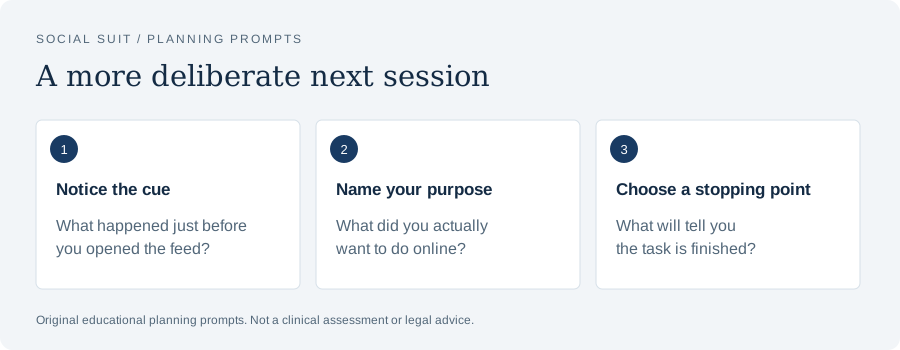
- Notice the cueWhat happened just before you opened the feed?
- Name your purposeWhat did you actually want to do online?
- Choose a stopping pointWhat will tell you the task is finished?
Decide how soon each message needs attention
Urgency is clearer when expressed as a response window. Some information needs attention immediately. Some should be checked before the end of an afternoon. Some can wait until a routine daily visit. Some has no required response at all. Thinking in windows helps you avoid treating every unreviewed item as overdue. The settings should support the window rather than silently invent it. If a task truly requires immediate notice, arrange an unmistakable route for that task. If a message can wait, make waiting part of the agreed system instead of an ongoing act of resistance.
Use specific examples to test your classification. If a school sends a routine newsletter, would reading it at dinner instead of at noon change anything? If a neighbor asks about next month's gathering, does responding after work create a problem? If a household member needs immediate help, do they know how to reach you? These questions reveal where an alert provides value and where it provides only a feeling of activity. They also expose situations in which silence would be impractical. The resulting plan can be more selective and more credible than a blanket statement that all notifications are distracting.
Avoid giving every category an immediate window just because an unusual emergency is imaginable. Instead, define an emergency route. For example, a family could agree to call for a time-sensitive issue and message for ordinary coordination. That example is hypothetical, and it will not suit every household. Some people cannot use calls easily, some schedules make ringing disruptive, and some services require a different channel. The useful principle is that urgency needs a reliable distinction. Adapt that distinction to the people's communication needs instead of copying a convention that creates new barriers.
Keep expectations modest while you test. A setting may fail to behave as you expect, a contact may use the old route, or a message may arrive through another device. Start at a low-stakes time and review what happened. If an important message was delayed, identify whether the problem was classification, configuration, or communication. Correct that part. There is no benefit in defending a quiet setup that repeatedly fails a real responsibility. The aim is less unnecessary demand and dependable access to necessary information, with room for ordinary changes in circumstances.
Understand the different alert surfaces
Notifications can demand attention through several surfaces. Sound is one. Vibration is another. A banner can cover part of the screen. A lock-screen preview can display text before you unlock the device. A badge can persist on an icon. A wearable can repeat the same event on your wrist. A desktop application can display it again beside your work. Reviewing only the sound setting may leave most of the demand intact. Look at the path an alert takes through your devices and decide which surfaces serve a purpose for that specific message category.
Consider the difference between receiving information and having it interrupt you. You might keep a notification in a notification center while removing its banner. You might preserve a badge for a work queue but silence its sound. You might keep the ability to open a messaging app while hiding message previews in public. These possibilities depend on the device and app, so use their current descriptions and official help material. There is no need to rely on a fixed sequence of taps in a general article, especially when an update can change labels or available controls.
Badges warrant a separate decision because their numbers can imply unfinished work. Ask what the number actually counts. It might include unread direct messages, reactions, promotional items, or recommended content. A large number does not necessarily represent a backlog of obligations. If you routinely open an app merely to erase a badge, hiding that surface may be a useful experiment. Keep another way to discover genuinely necessary items. The experiment should answer whether removing the visible count changes unwanted checking, rather than whether you can tolerate a particular number without touching it.
Check duplicate delivery. An alert that is manageable on one device may become demanding when it appears on a phone, watch, tablet, and computer. Duplication can be valuable for some responsibilities, but it should have a reason. A hypothetical remote worker might prefer workplace messages on the computer during work hours and a limited emergency route elsewhere afterward. Another person may need a wearable because they cannot reliably hear the phone. Map your own arrangement. The question is where an alert needs to reach you, not how many devices you can make silent.
Preserve accessibility and caregiving needs
Notification advice often assumes that everyone can simply leave a phone in another room. That assumption overlooks accessibility, health-related equipment, caregiving, and safety needs. Begin with the functions your arrangement must preserve. A phone might provide communication assistance, medication reminders, appointment coordination, or contact with a person who needs support. Those uses are not interchangeable with optional feed alerts. You can protect them explicitly while changing unrelated demands. A review that makes your day less accessible has not succeeded merely because the screen-time total falls.
If another person depends on your response, discuss the change in ordinary terms. Explain when you will check routine messages and what to use for time-sensitive contact. Test the route together if the situation calls for it. For example, a hypothetical caregiver could send a trial message while a focus setting is active, confirm the expected signal, and verify what happens when the device is locked. Do this before relying on the arrangement. A menu that appears correct is less informative than a practical test under the conditions in which the alert will need to work.
Consider barriers on both sides of the exchange. A person may be unable to call, may have limited connectivity, may share a device, or may need written information they can review. A plan that demands an unfamiliar channel could reduce reliable contact. Instead, look for the smallest adjustment that distinguishes urgent from routine within the tools already available. You may need to keep a broad alert category on and reduce interruptions elsewhere. That compromise can be sensible. A notification plan should accommodate real dependencies, not treat them as failures to enforce an ideal routine.
Revisit the plan when needs change. A new caregiving responsibility, a changed work schedule, travel, or a temporary health issue may justify different settings. Keep a brief note of the essential functions so you can restore or adapt them without rebuilding the whole inventory. Temporary exceptions can have an end date or a review point. When the exceptional situation ends, check whether the extra alerts still serve a purpose. Otherwise, a one-week accommodation can quietly become the default for months, long after the original need has passed.
Use checking windows without building another obligation
If you reduce alerts for messages that can wait, decide when you will see them. Otherwise, uncertainty can encourage constant manual checking. A checking window can be linked to something that already occurs: finishing lunch, arriving home, or starting a scheduled work session. It does not need to happen at a perfectly fixed minute. Its purpose is to provide a predictable opportunity to review information. Choose a frequency based on actual responsibilities. A personal hobby group might need far less frequent attention than a team coordinating today's tasks.
Define what a check includes. Open the relevant inbox, respond to items that require a response, note anything that needs later action, and leave. Without a definition, a checking window can become a feed session that happens to begin with messages. If an app mixes messages with recommendations, use the most direct available route to the inbox. Save useful content for a separate intentional visit when appropriate. The distinction matters because reducing notifications will not necessarily reduce browsing if every planned check still leads into an open-ended recommendation stream.
Allow messages to remain unread when no action is needed. A routine status update does not always require a reaction, a reply, or immediate clearing. Decide what completion means for the category. For a calendar reminder, it may mean confirming that the appointment is in your plan. For a group discussion, it may mean knowing the agreed time. For a promotional item, it may mean nothing at all. You are not required to transform every incoming item into a personal task. A useful window ends when its purpose has been met.
Keep the windows flexible enough to survive an ordinary interruption. If a planned afternoon check moves because of an appointment, use the next reasonable opportunity instead of compensating with repeated checks throughout the evening. If you repeatedly need information sooner, revise the window or add a narrow exception. If you repeatedly find nothing useful, consider checking less often. The schedule is a working assumption that can be tested. It should reduce uncertainty and support responsibilities, not produce anxiety about following an exact timetable that was never necessary in the first place.
Make work expectations explicit
Work notifications are often demanding because the social rule is unclear. A message might be informational, a request for a response today, or a genuine urgent task. If every message looks identical and no response window is stated, recipients may assume they must remain continuously available. Personal settings alone cannot resolve a workplace expectation. Where you have room to do so, ask your team or manager which channels carry urgent work, which can wait, and what happens outside scheduled hours. Frame the discussion around dependable coordination and completing work.
A hypothetical team could decide that ordinary project discussion stays in a shared channel, task deadlines appear in the task system, and urgent operational issues use a specific contact route. That arrangement would need to fit the job and existing policies. A healthcare role, emergency service, retail shift, or on-call position may have different obligations from office work. Do not assume that a general productivity suggestion overrides a workplace responsibility. Instead, identify the part you control, clarify the part you do not, and preserve required access while reducing redundant or promotional demands.
Separate your own notification delivery from what others see. A person sending an evening message may be working a different schedule and may not expect an evening reply. A clear response expectation can prevent their timing from becoming your interruption. Where tools support it, scheduled sending or status messages may help, but a written agreement matters more than a decorative availability indicator. People need to know what the indicator means. Avoid claiming that you are unreachable if an actual duty requires availability; describe the route and hours accurately.
Review duplication across workplace systems. The same task can generate an email, a chat message, a comment alert, and a calendar reminder. Identify which version contains the information you actually need. You may be able to remove redundant delivery while keeping the authoritative task record. Ask before disabling a channel that carries required notices. If the system is imposed and cannot be changed, consider whether display style, sound, or permitted focus settings can reduce disruption. The related guide on making work messages less constant explores this coordination problem in more detail.
Handle group conversations with care
Group conversations are unusual because a small number of active members can generate alerts for everyone. The topic may be valuable even when most individual messages are not urgent. Read the group's purpose and your role in it. Are you coordinating a near-term event, receiving essential announcements, socializing, or following a broad interest? A group that serves several purposes may need several expectations. Muting routine activity can be reasonable, but first identify how important decisions will be communicated and whether anyone expects you to notice a specific type of message promptly.
For a hypothetical family group, members might keep ordinary conversation in the group and contact a specific person directly for a pickup change. For a student project, members might place agreed deadlines in a shared document rather than relying on someone finding them inside a long conversation. These examples illustrate a principle, not a prescription for every group. The group needs a dependable place for commitments. When commitments are easy to find, participants can reduce the pressure to read every new line immediately without becoming less responsible to one another.
Do not turn a settings change into a judgment of the people involved. You can say that you will check the group after work or that direct contact is the better route for a time-sensitive request. There is no need to announce that everyone's messages are a distraction. Likewise, others may have different alert preferences without being careless or demanding. A group works better when communication expectations are clear enough to allow those differences. If you are the organizer, summarize decisions and deadlines so quieter notification settings do not require participants to reconstruct the agreement from dozens of messages.
Leave room for meaningful connection. Some spontaneous exchanges are enjoyable and worth keeping. You might choose to have group alerts available during a leisure period and quieter during focused work. You might remain in a smaller conversation while leaving a redundant group. The goal is to change the demand that troubles you, not remove every unplanned social moment. If a group is a major source of support, consider how you will maintain that support when you change delivery. Direct contact or a predictable visit may preserve the benefit while easing the interruption.
Notice when silencing alerts increases checking
A quiet device can still command attention if you keep checking it for reassurance. That outcome does not mean that reducing alerts was pointless. It means the alert was only part of the pattern. You may be uncertain about response expectations, afraid of missing an important event, or accustomed to checking during every pause. Observe what you are seeking when you open the app without a signal. Is there a specific message you need, or are you checking whether anything has happened? The answer suggests what kind of support the plan needs next.
If the concern is a specific message, improve its route or timing. You could agree on when a collaborator will send an update, or use a direct contact method for an urgent change. If the concern is broad uncertainty, give yourself a clear checking opportunity and a statement of what can wait. If the opening is automatic, change a cue or add a small pause. The guide to using friction to interrupt a scrolling habit offers practical ways to make an automatic opening easier to notice without removing essential access.
Compare your experience before and after the change using the original concern. If your aim was to finish a reading session without interruption, did the session become easier? If the aim was to stop waking for a chat, did the overnight disturbance change? Total phone pickups can provide context, but they do not explain every effect. A person may make fewer pickups while each one lasts longer. Another may keep the same number because necessary communication continues, yet experience less disruptive browsing. Interpret the numbers alongside what you intended to protect.
Avoid responding to manual checking with an increasingly complicated wall of restrictions. More settings may help, but complexity can also make you distrust the arrangement. Start by addressing the missing piece. Clarify urgent contact, shorten the review window if a real obligation needs it, or create a visible reminder of the next planned check. If checking remains hard to control and repeatedly affects sleep, responsibilities, or relationships, a qualified professional can help explore the broader situation. You do not need to establish a diagnostic label before asking for support with a troubling pattern.
Protect the evening without promising a sleep cure
Evening notifications can introduce unfinished tasks and emotionally engaging material at a time when you intended to settle down. Consider which alerts need to remain available overnight and which can wait until morning. A quiet period can be attached to your own schedule, including shift work, rather than a conventional bedtime. Make urgent access explicit. Test any exceptions and consider other household members who may hear your device. A predictable arrangement can make the evening less crowded, although no setting can guarantee a particular night's sleep.
The National Heart, Lung, and Blood Institute discusses regular sleep routines and avoiding bright artificial light near bedtime in its guidance on healthy sleep habits. That is general health guidance. It does not establish that every notification causes a sleep problem or that silencing a phone treats insomnia. In this article, the practical experiment is narrower: prevent nonessential alerts from restarting browsing after your chosen stopping point. Notice whether the evening becomes easier to manage and discuss persistent sleep concerns with an appropriate healthcare professional.
Look at the last step after an alert arrives. A single message may be manageable, but opening the app can expose you to a stream of content that has no natural endpoint. If you need to answer an important message, use the direct route, complete the reply, and return to your evening. Consider preparing a short list of unfinished tasks earlier so that an alert does not become the excuse to review all of tomorrow. The companion article on protecting the last hour before bed develops that routine separately.
Keep the plan usable during exceptions. Travel, caregiving, and unusual work duties may require a different overnight setup. A temporary adjustment can be sensible without turning every night into an exception. Decide when to review the change. If you use the phone as an alarm, preserve that function and verify it after changing focus settings. If you rely on other connected functions, check them too. Practical reliability is part of the plan. An arrangement that leaves you worried about whether an essential signal will arrive can invite more nighttime checking.
Consider children and teenagers as participants
When notifications affect a child or teenager, begin with what the alerts are interrupting and what useful connection they provide. Young people may use the same device for school coordination, friendship, creative activity, and entertainment. Ask which notifications they find demanding and which they need. A collaborative review can reveal distinctions an adult would otherwise miss. It can also establish how the young person reaches a trusted adult when something is troubling. Avoid treating a high alert count as a diagnosis or using the settings review as a public demonstration of misconduct.
The U.S. Surgeon General's advisory on social media and youth mental health discusses potential benefits, risks, and the need for protective action. It does not provide an individualized assessment of a particular young person's notification habits. Use the broader concern as context for a practical family conversation about sleep, schoolwork, safety, and connection. The setting change should fit the child's age, communication needs, and household responsibilities. A parent can model the same distinction between essential contact and optional alerts in their own use.
Make the agreement concrete. A hypothetical household might keep direct family contact available while reducing recommendation alerts during homework and overnight. The young person should know where important school information will appear and when it will be checked. Test the arrangement together. If a friend is experiencing a difficult situation, discuss how a young person can seek adult help rather than feeling responsible for monitoring messages continuously. Supportive connection matters, but a child should not have to act as an around-the-clock emergency service for peers.
Review the agreement without secret scorekeeping. Ask whether the change made a particular activity easier and whether any necessary information was missed. If an alert category proves useful, restore or adapt it. If another category creates distress, investigate the content and interaction rather than focusing only on the signal. Settings cannot resolve bullying, threats, or other serious online problems by themselves. Those situations need appropriate support and safety steps. A family notification plan is one practical part of a broader relationship in which the child can describe difficulties without fear that all online connection will immediately disappear.
Run a small experiment and read the result
Choose one recurring problem and one change. For example, you might silence recommendation alerts during an afternoon reading period, hide a promotional badge, or remove duplicate delivery from a secondary device. Write down what you expect to become easier. Keep the test long enough to include several ordinary opportunities, but small enough that you can identify what changed. If you alter every setting, relocate the phone, and begin a new work schedule simultaneously, you may like the result without knowing which adjustment deserves to become routine.
Use a few concrete observations. Did you finish the planned task? Did an important message reach you? Did you check manually more often? Did you feel uncertain about what you might be missing? Did another person have trouble reaching you? These questions capture both benefit and cost. A simple daily note can be more informative than a dramatic judgment about whether the day was successful. Include unexpected advantages, such as finding that a quiet check lets you respond more thoughtfully, and unexpected inconveniences, such as missing a routine change that needs a better channel.
When an experiment disappoints you, inspect the mismatch. Perhaps the disabled category included a useful update. Perhaps the quiet period began before a necessary coordination window ended. Perhaps the banner disappeared but the watch still vibrated. Perhaps the alert was removed successfully, yet opening the app remained the default response to a difficult task. Each explanation suggests a different revision. Reverting everything is one option, but it is not the only one. Keep the part that worked and adjust the part that failed a real need.
Make a brief maintenance note when you settle on an arrangement. Record the alert categories you kept, the route for urgent contact, and any periodic review that makes sense. Check after a major app or device change if delivery behaves differently. Avoid turning maintenance into a daily audit. A notification plan should eventually fade into the background and make ordinary activity easier. If you want a broader framework for reviewing your online habits, the social media resource collection connects this topic with attention, sleep, safety, and interpreting research without treating any one setting as a universal solution.
A practical walkthrough for a mixed-use phone
Imagine a hypothetical person whose phone carries family messages, a work chat, a hobby group, calendar reminders, shopping offers, and social recommendations. The immediate problem is losing track of a household task after several afternoon alerts. They first identify which of those alerts actually occurred during the task. The family message concerns tonight's dinner and can wait briefly. A shopping offer has no deadline that matters to them. The work alert belongs to a channel they are required to review during scheduled work hours, which have already ended. The recommendation merely invites browsing.
Their first adjustment is to remove the shopping and recommendation alerts. They leave family contact available and check whether the workplace permits routine channel alerts to be quiet after hours. They do not change the calendar reminder because it supports a real appointment. This is a hypothetical example, not a claim that everyone has the same employment flexibility. The important feature is the reasoning: each category is judged by purpose and required timing. The person is not trying to silence the phone as a symbolic achievement. They are trying to finish the household task while remaining reachable.
During the test, they notice that the hobby group's badge still prompts them to open the app. They examine what the badge counts and decide to hide it while retaining a planned evening visit. At that visit, they find the event information they need and leave several conversational messages unanswered because no response is required. The next day, a relative needs a timely reply and uses the agreed direct route. That works. The arrangement is becoming easier to trust because useful communication remains visible and optional content no longer asks for attention at every opportunity.
One afternoon, the person manually checks the feed despite receiving no alert. They note that they were avoiding a difficult errand, so they address the errand separately by writing the first step and preparing what it requires. This keeps the notification experiment in perspective. Removing signals helped with one pattern; it did not remove every reason for browsing. A good plan can acknowledge both findings. If the same situation keeps disrupting daily life, the person could seek support. The observation provides a concrete example to discuss without making a medical conclusion from a hypothetical scenario.
Decide what enough improvement looks like
Define success in everyday terms. You might want to hear the people at dinner without repeatedly looking down, finish a practice session, stop receiving marketing alerts during a commute, or preserve a quieter overnight routine. These goals do not require zero notifications. They require fewer mismatched interruptions and reliable access where it matters. When the goal is clear, a partial improvement can be meaningful. You can keep a change that makes a difficult period easier even if other parts of the day still need a different approach.
Watch for goals that quietly expand. A plan to remove promotional alerts can become a demand never to feel tempted to check anything. That is a different and much less practical standard. Returning to the original purpose helps you assess the result fairly. Did the unwanted alert stop arriving? Did necessary contact remain available? Did the protected activity improve? If so, the experiment taught you something useful. Further changes can be considered on their own merits rather than treated as proof that the first change was inadequate.
Leave room for enjoyment. An intentional visit to a favorite community, a timely message from a friend, or a creative update can be part of a good day. Notification preferences are about how those experiences reach you and what they interrupt. You can value an experience while choosing a quieter delivery method. Likewise, a quiet device does not oblige you to fill every recovered minute with productive work. Rest, ordinary conversation, and doing nothing briefly can be worthwhile uses of attention. The plan should support your priorities rather than replace app demands with a new demand to optimize yourself.
Return to professional support when the issue goes beyond a settings mismatch. If you repeatedly cannot stop checking despite wanting to, or the pattern seriously affects sleep, responsibilities, or relationships, discuss specific examples with a qualified professional. Settings can remain part of the practical response, but they are not an assessment or treatment plan. Keep the description concrete: what you intended, what happened, and what was affected. Making your notifications less demanding is a manageable place to begin. Its value is the space it creates for decisions you actually want to make.
Sources and further reading
These primary resources provide context. Our practical examples and planning suggestions are original educational material, not validated treatment protocols. Linked organizations do not endorse Social Suit.