 Social Suit
Educational information, not individual medical or legal advice. Practical examples are hypothetical and do not describe clients or study participants. This article is not represented as reviewed by a clinician or attorney. How we prepare our guides.
Put a pause where the unwanted action begins
Friction is a small additional step between a cue and an action. In a scrolling habit, that step might be opening a folder, using a bookmark instead of an app shortcut, reaching to a different place for the phone, or entering a login when you choose an optional session. Its purpose is to make the opening noticeable long enough for you to decide whether it serves your current intention. Friction is not a punishment and does not require making technology generally difficult. A useful change targets the route that repeatedly leads somewhere you did not mean to go.
Begin with a specific sequence. Perhaps you unlock the phone to check the weather, see a feed icon, and open it before getting dressed. Perhaps you reach for the device whenever a work page loads slowly. Perhaps a recommendation alert arrives while you are preparing dinner. Those are different starting points. A change placed at the wrong point may create inconvenience without interrupting the sequence. Describe the cue, the opening route, and the activity affected. Then ask where one extra step would give you enough time to recognize the choice.
Keep useful access visible in the plan. You may need the phone for navigation, accessibility, caregiving, work, or connection. Those functions should not be treated as interchangeable with unwanted scrolling. A bookmark could preserve a needed community while removing a broad feed shortcut. A notification exception could maintain a required contact route while silencing recommendations. A different device placement could reduce automatic reaching while remaining compatible with an important alert. The arrangement should fit the functions you actually use, not an idealized routine that assumes everyone can leave the device behind.
Choose a practical question for the experiment. 'Will moving this shortcut make the automatic opening easier to notice?' is more useful than 'Can I become a disciplined person?' The first question can be observed. The second turns every event into a judgment. A small change can produce useful information even if you still choose to browse deliberately. The goal is a clearer decision at the point of drift. If that point becomes visible, you can make additional choices about timing, content, and stopping without asking the technical obstacle to solve the whole pattern.
Map the cue before adding an obstacle
For a few ordinary days, notice when an unplanned visit begins. Record the situation, the first action, what you hoped the phone would do, and what happened next. Keep the note brief. A habit can begin with an external cue such as an alert, a physical cue such as sitting in a particular chair, or a situation such as waiting for a task to load. It can also begin during an emotion or a difficult decision. These observations are practical descriptions, not a diagnosis of the underlying cause.
Look for the earliest reliable point you can change. If the alert is the cue, moving the icon may help less than adjusting the alert. If the phone's position prompts reaching, a different placement may be worth testing. If a necessary app contains both a tool and a feed, a direct route to the tool may be more useful than hiding the entire app. The earliest point is not always the most feasible one, but it is a good place to inspect. A change that interrupts the sequence before you are absorbed can require less repeated decision-making.
Include the intended task in the map. Unplanned scrolling may interrupt an activity whose next step is unclear. If you are avoiding a difficult email, hiding an app can create a pause without making the email easier to begin. Prepare the first sentence, identify the question you need answered, or decide a manageable work interval. The friction and the task support do different jobs. One interrupts the unwanted route; the other makes the wanted route more available. Combining them can be more useful than increasing the obstacle while leaving the original task equally difficult.
Notice occasions when the cue does not lead to scrolling. Perhaps you leave the phone alone during a conversation, use a direct bookmark when a task is clear, or stop after a purposeful message. Ask what conditions support those moments. They can reveal a workable arrangement you already use somewhere else. A baseline that records only unwanted visits may hide that evidence. The guide on why you open an app without deciding to offers a fuller way to examine cues without turning an automatic action into a character flaw.
Match the size of the step to the problem
The extra step should be large enough to notice and small enough to tolerate during legitimate use. Moving an icon one position may be too subtle if you open it without looking. Requiring a complicated setup for every needed message may be too costly. Start with a modest change and watch the result. You are trying to interrupt one route, not demonstrate that inconvenience itself is beneficial. An arrangement that is repeatedly bypassed, forgotten, or incompatible with responsibilities may need to be simplified or placed elsewhere in the sequence.
Think about frequency. A step that is acceptable for optional entertainment twice a day may be unreasonable for an accessibility function used dozens of times. Likewise, a delay that is harmless for a hobby feed may be inappropriate for urgent coordination. Evaluate friction by the job it touches. The same technical change can have different effects for different people and periods. A practical experiment includes both the unwanted visit you hope to reduce and the necessary visit you must preserve. Test the latter before relying on the arrangement in a high-stakes situation.
Consider reversibility. A moved shortcut or changed placement is easy to restore. Deleting data, abandoning an important group, or making account changes with long-term consequences is a different kind of decision. You do not need a dramatic action to test whether a pause helps. Prefer a change you can inspect and adjust. If you later choose a broader change, do so with a clear understanding of what you will lose and how necessary functions will continue. The initial experiment should give you information, not force you into an irreversible commitment before you understand the pattern.
Define the moment of choice after the step. You might ask, 'What did I open the phone for?' or read a short note naming the protected activity. Without that moment, friction can become just another action in the habit. You move through the folder automatically and enter the feed as before. The step is useful because it prompts recognition, not because it consumes a few seconds. If recognition happens, decide whether browsing belongs now. Deliberately choosing a planned leisure session can be a valid outcome of the pause.
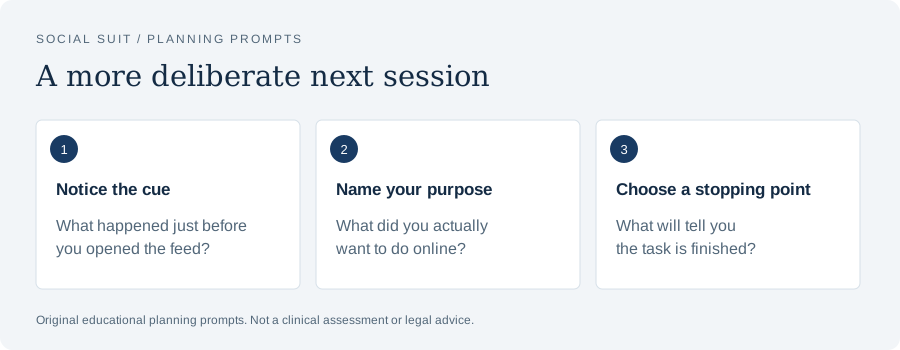
- Notice the cueWhat happened just before you opened the feed?
- Name your purposeWhat did you actually want to do online?
- Choose a stopping pointWhat will tell you the task is finished?
Change the home-screen route
An app shortcut on the first screen can become part of the route into every phone task. If you routinely open it after checking something unrelated, moving it may help separate those actions. Put necessary tools where they remain easy to reach. Move the optional feed to a location that requires a deliberate search or a clearly labeled folder. The label can describe its purpose, such as leisure, rather than scolding you. This is a hypothetical arrangement to test, not a rule that every person should organize the same way.
Watch whether you begin using another route instead. Search, a widget, a browser tab, or a notification may still open the feed without the moved icon. That does not mean the change was useless; it means the route map was incomplete. Identify the route you actually use and decide whether it needs its own adjustment. Avoid removing every alternative at once unless there is a clear reason. A direct link to a useful group may be worth keeping even while the broad feed route becomes less prominent.
Keep the first screen aligned with common tasks. If your most frequent purposeful uses are the calendar, messages, a transit tool, and accessibility controls, make those straightforward. A less demanding setup should not require extra effort for the functions you want to use. Review whether the changed layout causes confusion or errors. Some people rely on familiar placement, labels, or assistive features and may prefer a different form of friction. The useful principle is to separate the optional opening from the necessary opening in a way that fits your interaction with the device.
After several ordinary opportunities, review the result. Did you notice the opening more often? Did you simply learn the new location and resume the same sequence? Did you switch to another feed? Did useful phone tasks become easier because fewer invitations were visible? Those are different findings. Keep a helpful layout and address the remaining cue separately. If the moved icon becomes automatic again, you may need a purpose question or a clearer task transition rather than repeatedly rearranging the screen. Maintenance should not become another constant digital project.
Use direct access for the useful part
Sometimes the most effective friction is a narrower route rather than a longer route. If you need a support group, a creator's tutorial, or a school announcement, a direct bookmark can take you there without starting at a broad recommendation feed. The feed remains available when you intentionally choose it, but it no longer sits between you and every useful task. Check that the direct route works on your device and does not hide essential information. Interfaces change, so review what actually opens rather than assuming a bookmark always reaches the same view.
Define the direct task. You might read the announcement, answer the message, view the selected demonstration, or note the agreed time. Completion should be apparent. If recommendations appear alongside the task, decide whether opening them would be a new activity. A direct route can reduce invitations, but it cannot make that decision for you. The practical pause is the moment when the original job is complete. Use it to leave or to choose another visit deliberately. This prevents a useful tool from becoming automatic permission to browse everything attached to it.
Keep saved links manageable. A large folder of loosely useful bookmarks can become another stream with no endpoint. Name a link for the task it supports when possible. Remove obsolete links during ordinary maintenance rather than feeling obliged to review every saved item. The same applies to saved videos and articles. A reference earns its place by helping with something you value, not by representing content you owe your past self. Direct access should simplify purposeful use, not build a parallel backlog that asks for continuous attention.
Test whether a different format serves the task better. A written guide may be easier to consult than a clip. An official service page may answer a question better than a social post. A direct conversation may be better for coordination than a group feed. These alternatives are not universally superior; they fit particular jobs. Choose based on what you need to accomplish. Friction works here by removing an unnecessary route and replacing it with an intentional one. The change can preserve the benefit while reducing the chance of drifting into unrelated material.
Adjust physical placement thoughtfully
Where the phone rests can make reaching automatic. A device beside the keyboard, on the dinner table, or near the pillow may enter activities that did not require it. Moving it a short distance can create a pause. Begin with the period you want to protect and the functions that must remain available. A charger across the room may fit one person's evening, while another needs the phone close for accessibility or caregiving. The appropriate placement is the one that interrupts optional reaching without undermining necessary use.
Choose a location that is practical rather than symbolic. If you need the phone for a recipe, a stable place that keeps the recipe visible may be better than hiding it. If you need calls during a work period, a nearby location with an audible or otherwise accessible signal may be appropriate. If you do not need the device for a short task, placing it outside immediate reach may help. Test the signal you rely on. A plan that works only when the room is silent may not be dependable during normal household activity.
Prepare the alternative action where your attention returns. If the device leaves the desk but the task remains vague, you may spend the interval thinking about checking it. Put the next work step in view. At a meal, make the conversation or food the obvious activity. Near bedtime, prepare the routine you want to follow. These are ordinary environmental supports, not guarantees of concentration or sleep. They help the pause lead somewhere. Friction without a wanted route can leave you with an empty decision that the feed is well placed to fill.
Review the placement after circumstances change. A new responsibility, illness, travel, or altered schedule may justify a temporary adjustment. Give the exception a review point. Otherwise, the device can return to the old location for a legitimate reason and remain there after the need ends. Avoid treating this as a moral failure. Restore the arrangement that fits the current situation. A durable plan is adaptable. It should explain why the phone belongs somewhere during a particular activity, rather than demand one location for every part of the day.
Use login and access changes carefully
Logging out between optional sessions can provide a noticeable step before browsing. It may also create inconvenience, lost access, or difficulty for someone who uses the service frequently for necessary tasks. Consider the practical cost before choosing it. Preserve account recovery information through appropriate secure methods and follow the service's official guidance. Do not share credentials or move them into an unsafe place merely to make the experiment easier. A habit change should not weaken account security or leave you unable to reach a community or tool you rely on.
Avoid turning security controls into a game of self-obstruction. Repeatedly inventing passwords you cannot remember, giving control of an account to someone without a clear arrangement, or disabling recovery can create problems unrelated to scrolling. A reversible login step is different from compromising ownership or access. If the service supports a simple sign-out that you can manage safely, test it at a low-stakes time. If not, choose another form of friction. There are many ways to create a pause without making account access fragile.
Consider whether a browser route is useful. Some people find a direct browser visit less automatic than opening an app, while others simply develop the same browsing habit there. The result depends on the interface and the person's route. Test the question rather than assuming the format change is inherently effective. Preserve needed functions, including messaging or accessibility features that may differ. If the browser omits a tool you rely on, another adjustment may fit better. A practical plan acknowledges those differences instead of interpreting inconvenience as proof that the new route is healthy.
Record what the access step teaches you. If you pause and decide not to browse because you recognize a different priority, the mechanism is working. If you log in automatically and continue, the step may have become part of the sequence. If you avoid useful tasks because logging in is burdensome, the cost is too high. These findings are more informative than whether the change reduced time in the short term. An effective arrangement should remain compatible with useful access and make choices clearer, not simply discourage every use through frustration.
Review notifications as part of the route
An alert can bypass the friction you placed elsewhere. A moved icon matters less if a banner opens the feed directly. Review categories that invite optional browsing, such as recommendations, popularity updates, or reminders to return. Keep categories that support real responsibilities. The guide on making your notifications less demanding describes how to evaluate purpose, urgency, and delivery. For this experiment, focus on whether an alert starts the sequence you want to interrupt and whether a narrower category change can remove that cue.
Consider the alert surface as well as the category. Sound, vibration, banner, badge, lock-screen text, and a wearable can each pull attention. You may be able to keep information available without letting it interrupt a task. Current options differ by device and app, so read their descriptions and test the result. A silent banner can still prompt a visit. A hidden banner with a persistent badge can still keep the count in view. Match the setting to the surface that actually matters in your sequence.
Preserve urgent contact explicitly. If family, caregiving, or work requires a timely response, identify the route and test it. Tell relevant people how routine and urgent messages should differ when appropriate. A quieter arrangement can otherwise create uncertainty that leads you to check manually more often. The goal is dependable communication with fewer unnecessary invitations. It is not a competition to receive the smallest number of alerts. If an important function must stay broad because of the available tools, reduce demand elsewhere rather than pretending a narrower control exists.
After changing alerts, watch for replacement checking. You may reopen the app because you are unsure what has arrived, even though no notification appears. Address that uncertainty with a clear checking window or communication expectation. If the cue is emotional or task-related, inspect that part instead. Notification changes solve the delivery problem they target; they do not erase every reason to browse. A useful experiment can show that one invitation disappeared while another route remains. That is progress in understanding the sequence, not evidence that the entire approach has failed.
Pair the pause with a manageable next step
The wanted action should be easier to begin than a vague instruction to stop scrolling. If you are protecting study, identify the next problem or paragraph. If you are protecting a household task, prepare the item you need first. If you are protecting a hobby, place the materials where you can start. The step should be small enough to do in the situation you are observing. A plan to reorganize your entire life is unlikely to help during a thirty-second pause created by moving a shortcut.
Use the pause to name the task, not to argue with yourself. 'I am opening the calendar to check the appointment' can guide a purposeful phone visit. 'I am returning to the first question on this page' can guide a work transition. A short statement is often enough. If you then choose to browse deliberately, define that visit's endpoint. You are practicing a decision rather than trying to eliminate every impulse. The distinction keeps friction connected to autonomy and useful activity instead of making it another demand to perform perfectly.
For a break, choose an activity that fits its duration and purpose. Water, a change of posture, a brief conversation, or looking away from the screen may be practical in some settings. Adapt to accessibility, space, and responsibilities. If entertainment is the chosen break, set a return point and prepare the next task. The guide on choosing breaks that do not become another feed explores this pairing. Friction at the feed opening can help, but a break still needs a reason to end.
If you repeatedly avoid the next task, consider the task itself. It may be unclear, too large, emotionally difficult, or dependent on information you do not have. Ask what would make the first step possible. You might need a question answered, a smaller scope, a conversation, or professional support for a broader difficulty. The phone may be the available escape without being the entire explanation. A practical plan can address both the escape route and the underlying obstacle, using each observation to decide what kind of help is appropriate.
Keep the experiment small enough to interpret
Choose one recurring cue and one change for a defined period. Write the expected effect in concrete terms. A hypothetical person might move the feed shortcut and expect to notice automatic openings during morning preparation. Another might place the phone away from the work surface and expect fewer casual checks during a selected task. Keep necessary functions unchanged unless they are part of the question. If several things change at once, you may enjoy the result but struggle to identify which adjustment deserves to become routine.
Record a few opportunities, not every minute. Did the cue occur? Did the extra step create a pause? What did you decide? Did the intended activity become easier? Was useful access delayed or lost? These observations capture the mechanism and the cost. A device total can provide context, but it cannot answer those questions alone. You might still use the platform for a planned period while reducing interruptions around another activity. That can be a meaningful outcome even if the total barely changes.
Choose a review point that includes ordinary variation. One unusually busy day may not reveal how the arrangement works. Several comparable opportunities can show a pattern, while notes about unusual circumstances help you interpret exceptions. Do not wait indefinitely for a perfect week. Real life contains interruptions. The question is whether the change helps under enough of your actual conditions to be worth keeping. If it works only during an idealized routine, adapt it to the responsibilities and constraints that repeatedly appear.
At the review, decide whether to keep, revise, or remove the change. Keep it if it creates useful pauses with acceptable cost. Revise it if the pause occurs at the wrong point or interferes with necessary use. Remove it if it adds inconvenience without helping the original problem. A removed experiment can still teach you something. You may discover that a notification expectation matters more than physical placement, or that task clarity matters more than icon location. The value is in that information, not in defending the first idea you tried.
Interpret bypassing without shame
You may move through the extra step automatically or deliberately bypass it. Describe which happened. Automatic bypassing suggests that the step became part of the habit or was too subtle to prompt recognition. Deliberate bypassing may reflect a real change in need, an unrealistic boundary, or a decision to browse despite another priority. These are different situations. A neutral account lets you adjust the plan. A sweeping conclusion that you have no self-control obscures the point where the plan and circumstances stopped matching.
If the step became automatic, consider whether a purpose cue would help. A folder label or a short note can remind you what you intended to protect. If the step is easy to ignore because the next task is unclear, prepare that task. If the step is so inconvenient that you disable it, reduce the cost. Increasing friction every time it is bypassed can create an arms race with your own device while leaving the reason for browsing untouched. The change should remain a tool for noticing, not a test you must make increasingly difficult to pass.
If you deliberately choose a planned leisure visit, do not label that as bypassing merely because the feed opens. Friction is supposed to create a decision. You can decide yes. The meaningful distinction is whether the choice fits the purpose and timing you intended. An arrangement that only counts refusal as success can discourage honest observation. It may also turn enjoyable, useful use into a source of unnecessary guilt. Keep the standard connected to the activity you want to protect and the route you want to change.
The guide on what to do after a scrolling setback offers a broader review of difficult sessions. For friction, focus on the moment the pause disappeared or stopped helping. Restore the next normal routine and add one support if needed. If repeated unwanted browsing seriously affects sleep, responsibilities, or relationships despite practical changes, seek qualified professional support. Bring examples of cues, attempts, and impact. A general article cannot identify the cause, and you do not need to establish a diagnostic label before discussing the concern.
Adapt friction for shared devices and households
A shared device requires a shared plan. Moving shortcuts, signing out, or changing alerts can affect someone else's work, accessibility, or communication. Identify who uses the device and what each person needs. Where separate profiles or personal settings exist, use the current official guidance to understand them. Where they do not, choose an arrangement everyone can navigate. A habit experiment should not quietly impose obstacles on another person. Explain the purpose and review any practical cost they experience, especially if they depend on familiar placement or reliable alerts.
In a household, physical placement can involve more than one person's preference. A charging location may reduce dinner interruptions but make an essential overnight signal difficult to hear. A phone basket might suit some activities and not others. Treat these ideas as options to test, not universal rules. Agree on exceptions and how urgent contact works. The plan should make the protected activity easier for the people involved. If it becomes a recurring argument about who complied, simplify the agreement and return to the original practical purpose.
For children and teenagers, explain the pause in terms they can use. Ask where opening becomes automatic and what activity they want to protect. Offer choices that preserve necessary school tools and supportive contact. Adults can model similar adjustments. The U.S. Surgeon General's advisory on social media and youth mental health discusses broader benefits, risks, and protective action, but it does not assess an individual child's friction experiment. The household plan should fit age, circumstances, and actual function rather than copying a fixed restriction.
Review the result with the young person. Did the change create a useful pause? Did it make schoolwork or friendship unnecessarily difficult? Did upsetting content or a worrying interaction reveal a separate concern? Listen to those differences. A settings adjustment is not a complete response to bullying, threats, or health difficulties. Appropriate support may be needed alongside the practical change. The child should understand that describing a problem is a route to help. A plan based only on hidden monitoring or punishment can make honest information about the pattern harder to obtain.
Respect the limits of the technique
Friction can change a route, but it cannot supply every missing resource. It does not diagnose attention problems, treat a mental health condition, resolve a conflict, or replace sleep care. It may be one useful part of a wider response. Keep claims proportional to the experiment. If moving an app helps you notice an automatic opening, report that result. Do not infer that the change has repaired a condition you were never assessed for. Practical improvement is valuable without being transformed into a medical conclusion.
Similarly, a technique that helps one person may not help another. Device use, accessibility, employment, caregiving, and available alternatives differ. A person who relies on online communities may need a narrower adjustment than someone who finds a platform optional. A worker whose role requires rapid updates may need a delivery review rather than a distant phone. These differences are reasons to tailor the plan, not exceptions that must be apologized for. The most useful question remains where a small step can create choice without blocking a real need.
Avoid interpreting general health guidance as proof of a particular mechanism. The National Heart, Lung, and Blood Institute's healthy sleep advice includes supportive routines and avoiding bright artificial light near bedtime. That provides context for an evening arrangement, but it does not show that moving your phone will resolve a sleep problem. If you try evening friction, assess the practical sequence: whether optional browsing restarts, whether necessary access works, and whether the routine is manageable. Persistent sleep concerns deserve appropriate healthcare advice.
If a broader professional conversation is needed, describe the pattern in concrete terms. Explain what you intended, what happened, how often the concern arises, and what it affects. Include the benefits of online use you want to preserve and the changes you have tested. This gives a professional more useful information than an unsupported label or a list of restrictions. You can continue practical adjustments while seeking help, provided they remain safe and compatible with responsibilities. A small environmental tool and a wider assessment can serve different, complementary purposes.
A hypothetical work pause redesigned
Imagine a hypothetical person who opens a feed whenever a work page takes time to load. The page delay is brief, but the visit often continues after the work becomes available. They map the sequence: waiting, reaching for the phone beside the keyboard, tapping a prominent icon, and losing the return point. Their first change is to place the phone on a nearby shelf while keeping required contact audible and accessible. They also write the next work step beside the keyboard. The placement creates a pause; the note gives the pause a direction.
During the first few opportunities, the person reaches toward the old location and notices the empty space. They read the next step and return to the page. On one occasion, a required message arrives, and they use the phone deliberately to respond. They then return it to the shelf. This is a hypothetical practical success, not evidence of a clinical outcome. It shows that useful access can remain while optional reaching becomes easier to notice. The person records the distinction instead of counting every phone use as a breach.
Later, they begin opening a browser feed on the work computer during the same delays. Their review identifies a replacement route. Rather than making the phone arrangement more restrictive, they address the waiting cue directly: a brief look away and a visible return task. They also consider whether the slow page requires a work-process fix. The original friction remains useful for one route, but the cue needs another support. This prevents the plan from becoming a series of escalating device restrictions that never addresses why the pause is difficult.
At the end of the experiment, the person keeps the nearby placement and the task note, removes an unnecessary extra login obstacle, and clarifies the required contact route with a collaborator. The plan is simpler than the collection of ideas they initially considered. It works by separating useful phone use from automatic browsing during a specific pause. The example illustrates a review based on mechanism and cost. It does not promise that the same arrangement fits another job, device, or household. Those details would need their own observation and test.
Build maintenance into ordinary changes
Once an arrangement helps, let it become ordinary. You do not need to redesign the device every week to demonstrate commitment. Review it when a relevant change occurs: a new app, a changed responsibility, a device update, or a recurring problem. Keep a brief note of the purpose so you can adapt without reconstructing the entire experiment. If a shortcut returns to a prominent place after an update, restore it if the original reason still applies. If the reason has changed, revise the arrangement rather than preserving an obsolete rule.
Notice when friction spreads beyond the intended route. A useful step can become burdensome if circumstances change and the function is now necessary more often. Reassess the cost. Perhaps a new work duty requires direct app access, while recommendation alerts can still be reduced. Perhaps caregiving changes the appropriate phone placement, while a purpose cue remains useful. A durable habit plan contains a reason for each adjustment. That reason lets you change the form without losing the goal, instead of treating every adaptation as abandonment of the experiment.
The social media resource collection connects friction with limits, notifications, breaks, sleep, and interpreting patterns. Use those resources according to the actual problem you observe. A cue change, a clearer endpoint, and a task transition do different jobs. You may need only one of them. If several are useful, add them deliberately and review their combined cost. The plan should eventually make the day easier to navigate, not become a complicated system that consumes the attention you hoped to recover.
Using friction well means creating a small, dependable place to choose. Map the sequence, preserve necessary access, place the step at the unwanted route, and pair the pause with a manageable next action. Observe whether the mechanism works and what it costs. Keep the helpful part and revise the rest. A feed can remain available for deliberate use while becoming less automatic during another activity. The practical result is a clearer relationship between what you intended to do and what the device helps you do next.
Sources and further reading
These primary resources provide context. Our practical examples and planning suggestions are original educational material, not validated treatment protocols. Linked organizations do not endorse Social Suit.